
Bodyper guides
Build a gym program you can use every week
A program keeps your workout days together so you can return to a familiar plan without rebuilding it before every session.
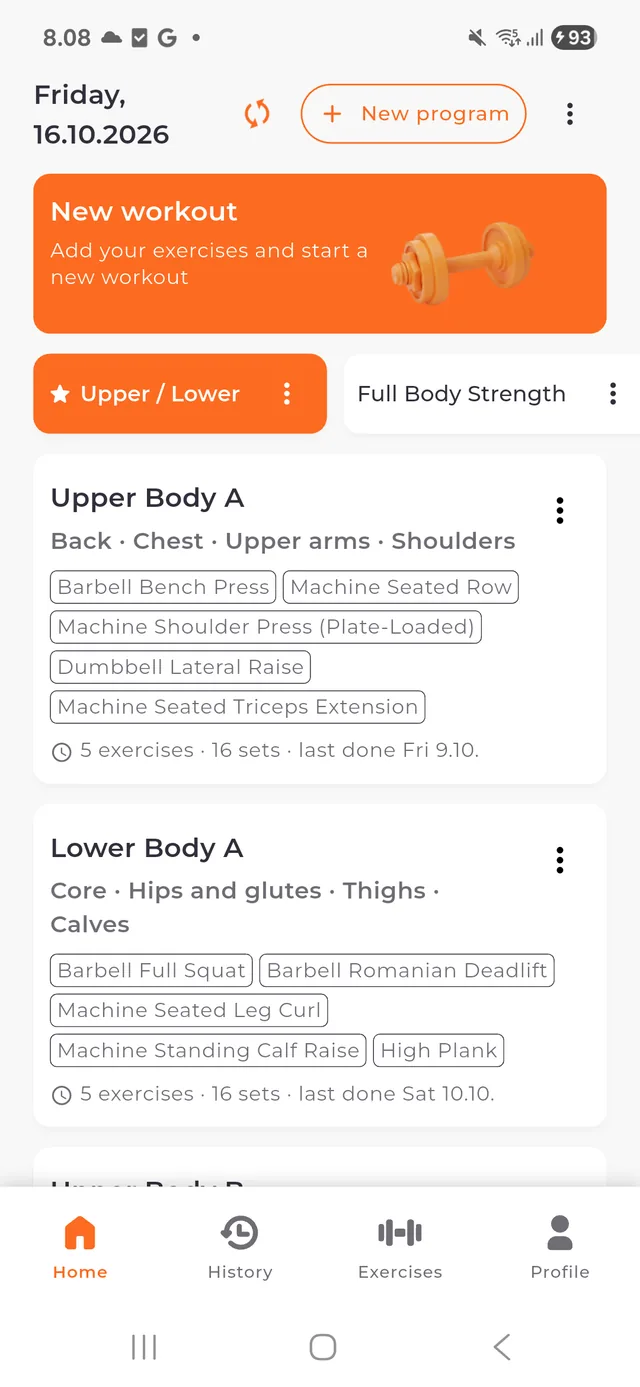
Create a program and its workout days
Give your program a name that helps you recognize it. Add workout days for the sessions you want to repeat: for example, an upper-body day and a lower-body day.
These are organizational examples, not a prescribed training plan. Build the schedule around your own needs and experience.
Choose and arrange your exercises
Add movements from the exercise library, checking equipment and exercise details as you go. Put exercises in the order you want to perform them.
You can edit, reorder or remove exercises and workout templates locally. Program planning is part of the core offline experience.
Prepare the sets you want to record
Set up the workout day before starting. Bodyper supports the relevant recording fields for each exercise, including weight, repetitions, time or distance.
Check the displayed unit when entering a target or result. A plan is a starting point; record what you actually perform during the workout.
Start the workout and keep its history
Start a session from the workout day, confirm your completed sets and finish the workout when you are done. Your completed session becomes part of your training history.
Changing your program for next time does not rewrite the workout you already completed. Use the history correction flow when you need to correct an earlier record.
Keep exploring
Find exercises and videos for your gym program
Explore 7,500+ exercises in Bodyper. Search by name, filter by equipment and muscles, and play demonstration videos before adding a movement to your program.
Log a workout without an internet connection
Train offline with Bodyper: use local programs, record sets, resume your active workout and view saved history. Sync recorded training when you reconnect.
Understand your workout statistics and progress
See what Bodyper statistics show: training activity, volume, exercise records, muscle distribution, measurements and reports, with longer comparisons in Premium.